
- Messages
- 37
- Reaction score
- 39
- Points
- 868
Hello CCM!
I've released v2.0.0 of bgIW4, my Modern Warfare 2 LAN/offline client.
You can play Multiplayer private matches and Special Ops co-op over LAN. One player hosts, the others press Join Host in the game. No Hostmode, no external master server and no internet connection are needed.
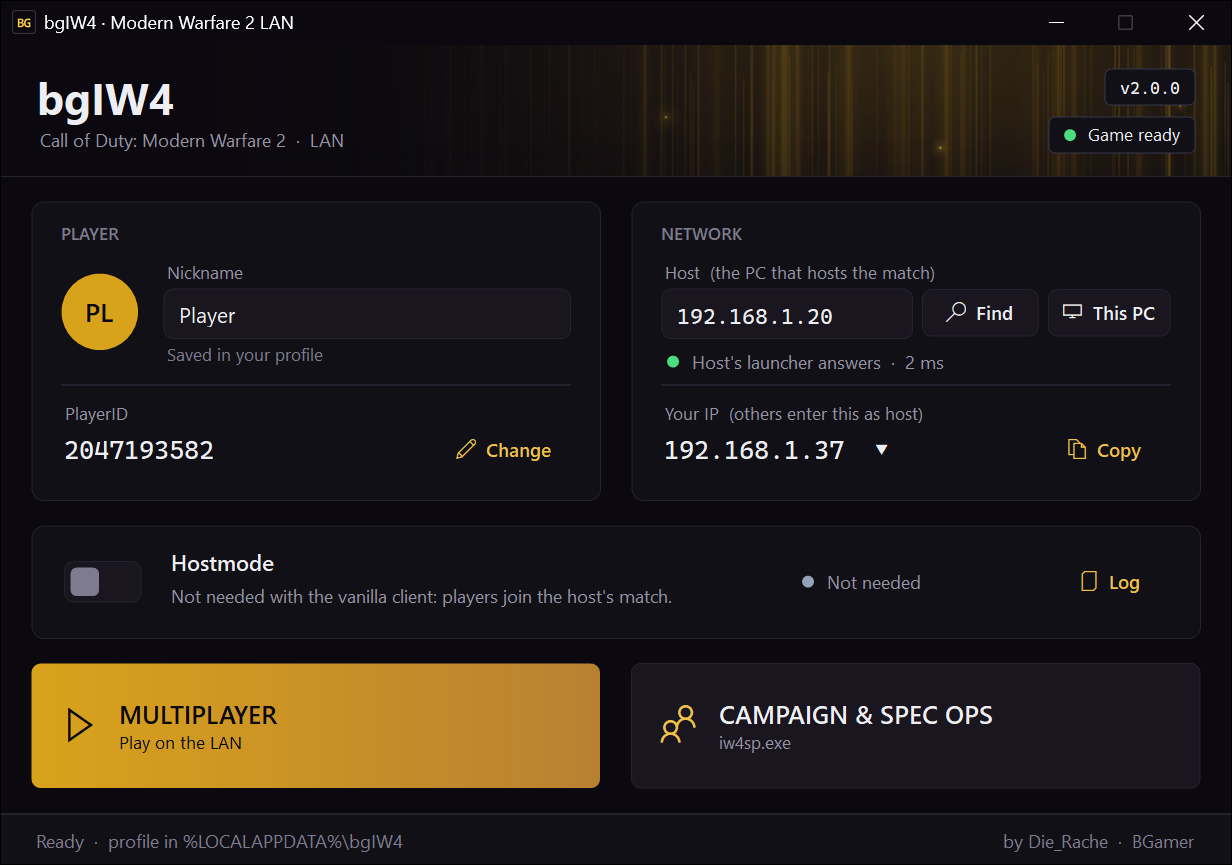
bgIW4 v2.0.0 is a complete rework: the same launcher as bgT5 v0.9.0, a Join Host button in the game's own menus, and Special Ops co-op over LAN. The client stays close to the original game: no mods and no custom menus, only what LAN play needs.
Download and setup guide:
Features
Requirements
Installation
The launcher backs up the original steam_api.dll and writes iw4mp.exe and iw4sp.exe from the old bgIW4mp.exe and bgIW4sp.dat; the old files stay. You can undo it using Remove bgIW4.
Start the launcher normally. Installing into a protected folder such as Program Files may ask for administrator permission for that step.
How to play
What's next?
Some of the things on my list:
These are planned improvements and investigations, with no fixed release dates. Some depend on what turns out to be possible.
Have a suggestion or a setup you'd like to help test? Let me know!
bgIW4 builds on alterIWnet and IW4M by NTAuthority; the Special Ops co-op follows momo5502's COD-MOD. Thanks to them, and to everyone who has kept playing and sharing feedback over the years!
If you find a bug, please reply with what happened, your game build, and whether you were hosting or joining. Include any error message and the relevant logs. Logs are in %LOCALAPPDATA%\bgIW4\logs.
I've released v2.0.0 of bgIW4, my Modern Warfare 2 LAN/offline client.
You can play Multiplayer private matches and Special Ops co-op over LAN. One player hosts, the others press Join Host in the game. No Hostmode, no external master server and no internet connection are needed.
bgIW4 v2.0.0 is a complete rework: the same launcher as bgT5 v0.9.0, a Join Host button in the game's own menus, and Special Ops co-op over LAN. The client stays close to the original game: no mods and no custom menus, only what LAN play needs.
Download and setup guide:
Features
- A completely redesigned launcher, the same as bgT5's.
- Join Host: the private match's join button joins the host set in the launcher. No console needed.
- Special Ops co-op (Two Player Online) over LAN. It no longer waits for Infinity Ward's servers; your partner joins with Join Host.
- No Hostmode or master server needed: the host simply opens a private match or a co-op lobby.
- Find lists everyone on your network who has the launcher open, so you can pick the host without typing an IP address.
- The launcher checks the host before starting and shows whose launcher answers.
- Choose the network you play on, including LAN, Wi-Fi or VPN.
- The launcher finds Modern Warfare 2 and can install, update or remove bgIW4. The game keeps its original file names (iw4mp.exe, iw4sp.exe).
- Your PlayerID and nickname are saved locally; an existing one from bgset.ini is taken over.
- No administrator rights needed for playing or hosting.
- A log file to help with bug reports.
Requirements
- A legitimate installation of Call of Duty: Modern Warfare 2. Game files are not included.
- Supported build: the Modern Warfare 2 executables of an earlier bgIW4 installation (multiplayer build 177, singleplayer build 159). The current Steam version isn't supported yet; the launcher shows "Game version not supported" for it.
- Windows with .NET Framework 4.8, which is included in Windows 10 version 1903 and later, and Windows 11.
Installation
- Download v2.0.0 from the website above.
- Extract the ZIP to a folder of your choice.
- Open bgIW4Launcher.exe. If it doesn't find Modern Warfare 2 automatically, select your game folder.
- Click Install when prompted.
The launcher backs up the original steam_api.dll and writes iw4mp.exe and iw4sp.exe from the old bgIW4mp.exe and bgIW4sp.dat; the old files stay. You can undo it using Remove bgIW4.
Start the launcher normally. Installing into a protected folder such as Program Files may ask for administrator permission for that step.
How to play
1. Enter your nickname.
2. Under Your IP, select the network you play on.
3. Click This PC so the Host field points to your own address.
4. Start Multiplayer and open a private match. For Special Ops, start Campaign & Spec Ops, open Special Ops and choose Two Player Online.
Hostmode isn't needed and is greyed out. Keep the launcher open so the others can find you with Find, or send them your IP (Your IP has a Copy button).
2. Under Your IP, select the network you play on.
3. Click This PC so the Host field points to your own address.
4. Start Multiplayer and open a private match. For Special Ops, start Campaign & Spec Ops, open Special Ops and choose Two Player Online.
Hostmode isn't needed and is greyed out. Keep the launcher open so the others can find you with Find, or send them your IP (Your IP has a Copy button).
1. Click Find and select the host, or enter the host's IP address manually.
2. Wait until the status under Host says that the host's launcher answers.
3. Start Multiplayer, open a private match and press Join Host.
4. For Special Ops: start Campaign & Spec Ops, choose Special Ops, Two Player Online, and press Join Host.
In Multiplayer, typing connect followed by the host's IP in the console works too.
Find may not work across routers or some VPNs. In that case, enter the host's IP manually.
2. Wait until the status under Host says that the host's launcher answers.
3. Start Multiplayer, open a private match and press Join Host.
4. For Special Ops: start Campaign & Spec Ops, choose Special Ops, Two Player Online, and press Join Host.
In Multiplayer, typing connect followed by the host's IP in the console works too.
Find may not work across routers or some VPNs. In that case, enter the host's IP manually.
If Windows asks, allow bgIW4Launcher.exe, iw4mp.exe and iw4sp.exe.
For a firewall rule made by hand:
• Game traffic: UDP 28960 (Multiplayer and Special Ops co-op)
• Find and the host check: UDP 3076
For a firewall rule made by hand:
• Game traffic: UDP 28960 (Multiplayer and Special Ops co-op)
• Find and the host check: UDP 3076
Install v2.0.0 into your existing bgIW4 game folder. The launcher turns bgIW4mp.exe and bgIW4sp.dat back into iw4mp.exe and iw4sp.exe and keeps the old files.
Your PlayerID and nickname are taken over from bgset.ini. v0.5 had no PlayerID, so you get a new one there.
The old custom menus in bgData and their "Connect to" button aren't used anymore; use Join Host instead. Use v2.0.0 on all players' PCs.
Your PlayerID and nickname are taken over from bgset.ini. v0.5 had no PlayerID, so you get a new one there.
The old custom menus in bgData and their "Connect to" button aren't used anymore; use Join Host instead. Use v2.0.0 on all players' PCs.
• Only the build of the earlier bgIW4 installations is supported. The current Steam version isn't supported yet.
• Matchmaking (Find Game) doesn't work yet. Play in a private match instead.
• Special Ops co-op: the first start of a mission can hang on "Waiting for the other player". Leave and start it again.
• Special Ops co-op: quitting during a mission can restart the map instead of going back to the lobby.
• IPv4 only.
• Windows may ask at the launcher's first start whether to let it through the firewall.
• Windows 7 is untested and requires .NET Framework 4.8 separately.
• Matchmaking (Find Game) doesn't work yet. Play in a private match instead.
• Special Ops co-op: the first start of a mission can hang on "Waiting for the other player". Leave and start it again.
• Special Ops co-op: quitting during a mission can restart the map instead of going back to the lobby.
• IPv4 only.
• Windows may ask at the launcher's first start whether to let it through the firewall.
• Windows 7 is untested and requires .NET Framework 4.8 separately.
What's next?
Some of the things on my list:
- Matchmaking over LAN: Find Game between the PCs on your network. This is in the works.
- Fixing the Special Ops co-op issues listed above.
- Steam build compatibility: Check and add support for the current Steam version of Modern Warfare 2.
These are planned improvements and investigations, with no fixed release dates. Some depend on what turns out to be possible.
Have a suggestion or a setup you'd like to help test? Let me know!
bgIW4 builds on alterIWnet and IW4M by NTAuthority; the Special Ops co-op follows momo5502's COD-MOD. Thanks to them, and to everyone who has kept playing and sharing feedback over the years!
If you find a bug, please reply with what happened, your game build, and whether you were hosting or joining. Include any error message and the relevant logs. Logs are in %LOCALAPPDATA%\bgIW4\logs.
Last edited:

 Thanks for sharing!


