
- Messages
- 37
- Reaction score
- 39
- Points
- 868
Hello CCM!
It's been a while! I've released v1.0.0 of my Black Ops LAN/offline client, bgT5.
You can play Multiplayer and Zombies over LAN, run a dedicated server, or play Combat Training against bots. One PC runs Hostmode and the others connect to it — no external master server is needed.
v1.0.0 adds support for the current Steam version of Black Ops: Multiplayer, the dedicated server, and the German Campaign & Zombies. The older builds still work as before.
Download and setup guide:
What's new in v1.0.0?
What's new since v0.7?
Requirements
Installation
The launcher backs up the original steam_api.dll. You can restore it using Remove bgT5.
Start the launcher normally. Installing into a protected folder such as Program Files may ask for administrator permission for that step.
Already using v0.9.0? Extract v1.0.0 and start the new launcher: it offers to update bgT5 in your game folder. Your player and stats stay.
How to play
What's next?
I plan to keep improving bgT5. Some of the things on my list:
These are planned improvements and investigations, with no fixed release dates. Some depend on what turns out to be possible.
Have a suggestion or a setup you'd like to help test? Let me know!
Thanks to everyone who has kept playing and sharing feedback over the years!
If you find a bug, please reply with what happened, your game build, and whether you were hosting or joining. Include any error message / relevant logs and crashdumps.
If you need any help or have detected a bug feel free to contact me
[/SPOILER]
It's been a while! I've released v1.0.0 of my Black Ops LAN/offline client, bgT5.
You can play Multiplayer and Zombies over LAN, run a dedicated server, or play Combat Training against bots. One PC runs Hostmode and the others connect to it — no external master server is needed.
v1.0.0 adds support for the current Steam version of Black Ops: Multiplayer, the dedicated server, and the German Campaign & Zombies. The older builds still work as before.
Download and setup guide:
What's new in v1.0.0?
- Current Steam version: Multiplayer and the dedicated server (7.0.189), and the German Campaign & Zombies (7.0.145).
- Tested over LAN: a dedicated server with bots, private matches played to the end, and a Zombies lobby with 4 players.
- Safer patching: bgT5 recognises each supported game executable exactly and checks every place before changing it. An unknown executable is left alone, with a clear message.
- Faster startup on the Steam version (about 25 seconds less), as long as the Steam client is open.
- Fixed a LAN service error when a player joined a Zombies lobby.
What's new since v0.7?
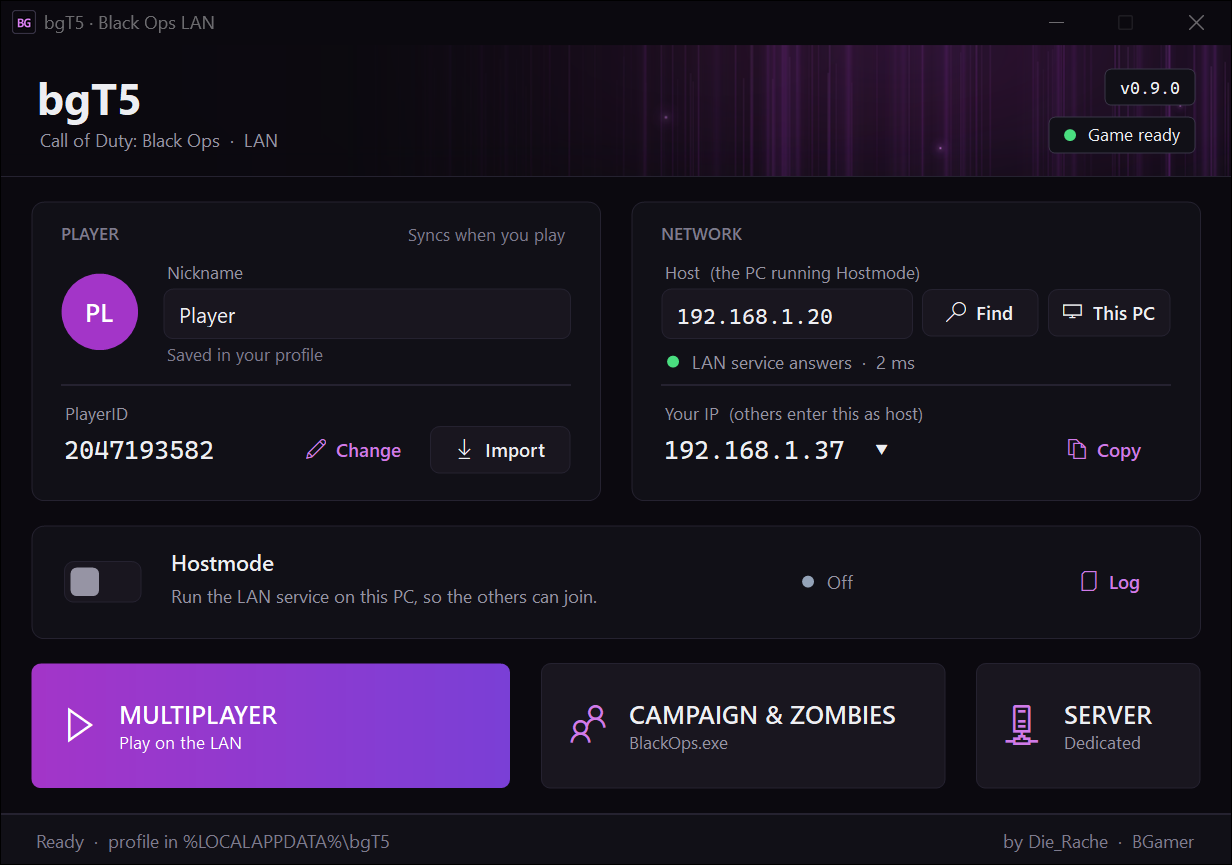
- A completely redesigned launcher.
- Your stats, classes and playercard are saved locally and synced with the host, so your progress follows you when someone else hosts. The host needs v0.9.0 too.
- Find hosts on your network without entering an IP address.
- Choose the network you play on, including LAN, Wi-Fi or VPN.
- The launcher finds Black Ops and can install, update or remove bgT5.
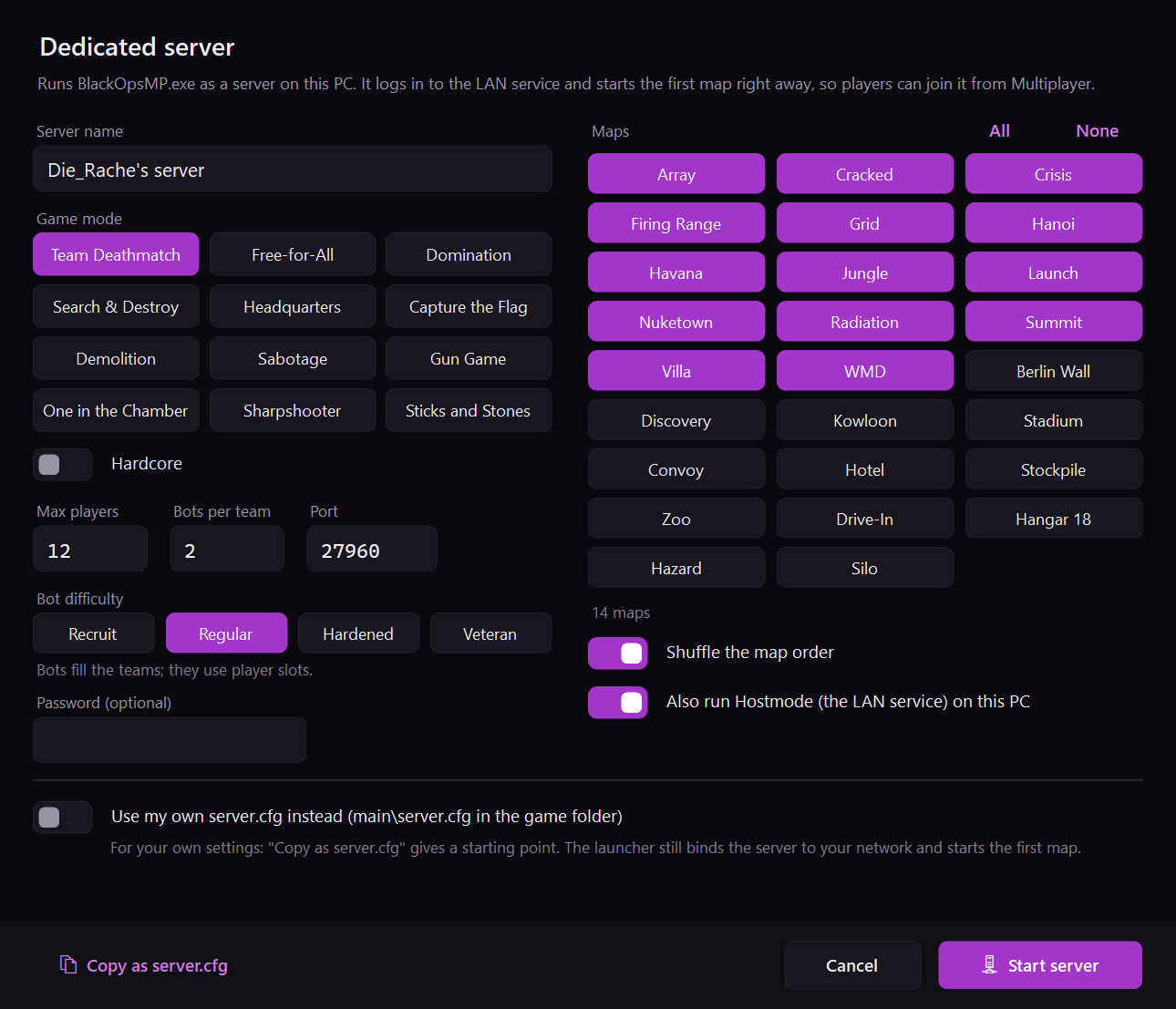
- Set up a dedicated server directly in the launcher: game mode, maps, Hardcore, player limit, password and bots.
- Dedicated servers load their first map automatically.
- The in-game friends list now works for every player, rather than only the host.
- Fixes for Zombies connections on PCs with VPNs or virtual network adapters.
- No administrator rights needed for playing or hosting.
- Clearer connection checks, duplicate PlayerID detection, logs and crash reports.
Requirements
- A legitimate installation of Call of Duty: Black Ops. Game files are not included.
- Supported builds:
- Current Steam version: Multiplayer 7.0.189, German Campaign & Zombies 7.0.145.
- Older version: Multiplayer 7.0.164, Singleplayer/Zombies 7.0.152. - Everyone plays the same version: all on the current Steam version, or all on the older one. The two can't see each other's games.
- With the Steam version, keep the Steam client open while playing (offline mode is fine). Without it, the game waits about 30 seconds at startup.
- Windows with .NET Framework 4.8, which is included in Windows 10 version 1903 and later, and Windows 11.
Installation
- Download v1.0.0 from the website above.
- Extract the ZIP to a folder of your choice.
- Open bgT5Launcher.exe. If it doesn't find Black Ops automatically, select your game folder.
- Click Install when prompted.
The launcher backs up the original steam_api.dll. You can restore it using Remove bgT5.
Start the launcher normally. Installing into a protected folder such as Program Files may ask for administrator permission for that step.
Already using v0.9.0? Extract v1.0.0 and start the new launcher: it offers to update bgT5 in your game folder. Your player and stats stay.
How to play
1. Enter your nickname.
2. Switch on Hostmode and allow network access if Windows asks.
3. Under Your IP, select the network you play on.
4. Click This PC so the Host field points to your own address.
5. Start Multiplayer, or Campaign & Zombies for Zombies.
Keep the launcher running while hosting.
2. Switch on Hostmode and allow network access if Windows asks.
3. Under Your IP, select the network you play on.
4. Click This PC so the Host field points to your own address.
5. Start Multiplayer, or Campaign & Zombies for Zombies.
Keep the launcher running while hosting.
1. Click Find and select the host, or enter the host's IP address manually.
2. Wait for "LAN service answers".
3. Start Multiplayer, or Campaign & Zombies for Zombies.
Find may not work across routers or some VPNs. In that case, enter the host's IP manually.
2. Wait for "LAN service answers".
3. Start Multiplayer, or Campaign & Zombies for Zombies.
Find may not work across routers or some VPNs. In that case, enter the host's IP manually.
Click Server next to Multiplayer, choose your settings and click Start server.
Enable Also run Hostmode on this PC if this PC will provide the LAN service too.
The server loads the first map automatically. Players join it from Multiplayer.
You can also use your own main\server.cfg.
Enable Also run Hostmode on this PC if this PC will provide the LAN service too.
The server loads the first map automatically. Players join it from Multiplayer.
You can also use your own main\server.cfg.
The launcher can import an existing player from an old bgT5 game folder using Import.
In v0.7, player stats were stored on the hosting PC. If someone else hosted your games, import from that host's old game folder to bring your progress over.
Use v0.9.0 on the host and all players' PCs to get the new stats sync.
In v0.7, player stats were stored on the hosting PC. If someone else hosted your games, import from that host's old game folder to bring your progress over.
Use v0.9.0 on the host and all players' PCs to get the new stats sync.
• The current Steam version and the older version can't play together.
• With the Steam version, keep the Steam client open (offline mode is fine).
• Join session in progress is unavailable. Use invites or private matches instead.
• Wager Match from the menu does not find or start matches. Gun Game, One in the Chamber, Sharpshooter and Sticks and Stones work on dedicated servers without betting COD Points.
• On the Steam Multiplayer version: RCON runs commands but shows no replies (see the server console), bots keep the game's names, players use UDP port 3074 instead of 28960, and custom IWD mods may be refused.
• In the German Campaign & Zombies, the menu ticker and the Zombies game name keep their original text.
• IPv4 only.
• Windows 7 is untested, requires .NET Framework 4.8 separately and has missing launcher icons.
• With the Steam version, keep the Steam client open (offline mode is fine).
• Join session in progress is unavailable. Use invites or private matches instead.
• Wager Match from the menu does not find or start matches. Gun Game, One in the Chamber, Sharpshooter and Sticks and Stones work on dedicated servers without betting COD Points.
• On the Steam Multiplayer version: RCON runs commands but shows no replies (see the server console), bots keep the game's names, players use UDP port 3074 instead of 28960, and custom IWD mods may be refused.
• In the German Campaign & Zombies, the menu ticker and the Zombies game name keep their original text.
• IPv4 only.
• Windows 7 is untested, requires .NET Framework 4.8 separately and has missing launcher icons.
I plan to keep improving bgT5. Some of the things on my list:
- Custom patches with bgcustom.dll: Publish the sample plugin separately, with source code and documentation for creating your own patches.
- Launching mods: Make it easier to select mods from the launcher and test their compatibility with LAN play.
- Joining running matches: Investigate why Join session in progress is disabled.
- Research >4 Player Zombie Matches: Research if it is possible to have larger Zombie sessions.
- Better guides: More setup examples for LAN, VPN play, dedicated servers and importing old profiles.
These are planned improvements and investigations, with no fixed release dates. Some depend on what turns out to be possible.
Have a suggestion or a setup you'd like to help test? Let me know!
Thanks to everyone who has kept playing and sharing feedback over the years!
If you find a bug, please reply with what happened, your game build, and whether you were hosting or joining. Include any error message / relevant logs and crashdumps.
If you need any help or have detected a bug feel free to contact me
[/SPOILER]
Attachments
Last edited:


